

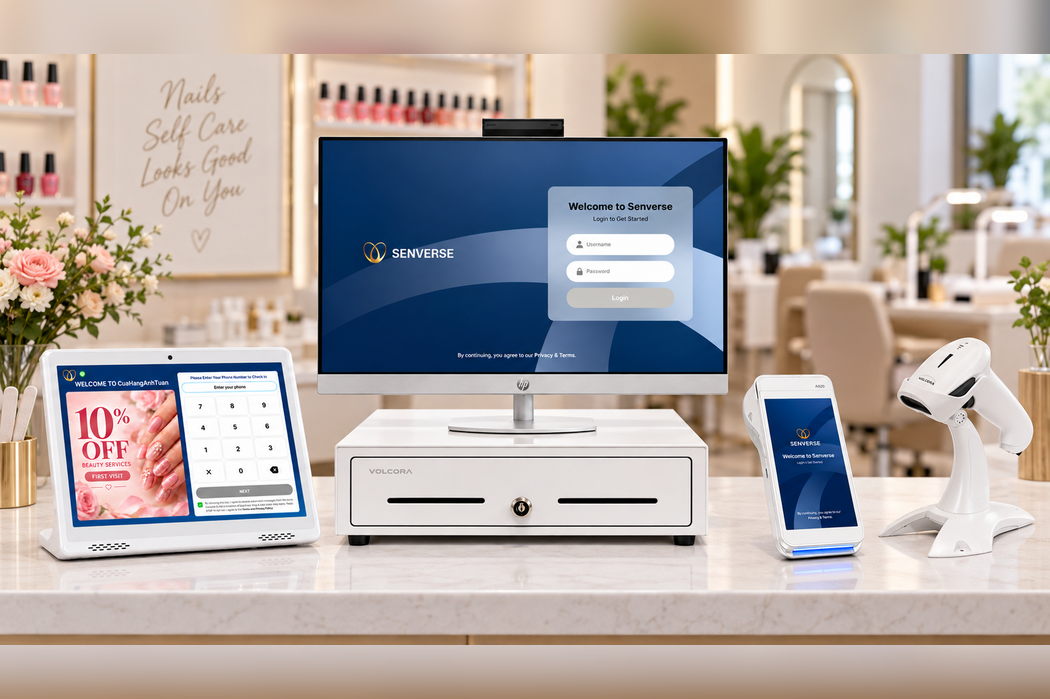
A nail salon POS setup usually includes more than a single screen at the front desk. The basic system is built around a compatible device for running the POS software, an approved payment setup, and a reliable network connection. Printing or ticket-handling equipment may also be needed when it supports the salon’s specific receipt, service ticket, or operational workflow.
Typical nail salon POS hardware requirements may include:
- A main POS workstation or compatible device
- A payment terminal
- A receipt or service ticket printer when required by the salon’s workflow
- A stable internet connection and network equipment
- Optional devices such as a check-in tablet, customer-facing display, cash drawer, or ticket scanner
The right configuration depends on your salon’s workflow, number of checkout stations, available counter space, and payment setup. Identify what is required, optional, or reusable before purchasing equipment.
This guide provides a practical checklist to help you plan your nail salon POS equipment, prepare each salon area, and ask the right questions before installation.
What Hardware Does a Nail Salon POS System Need?
Nail salon POS hardware may support daily tasks such as client check-in, appointment management, service processing, payment acceptance, and receipt or ticket printing. The required combination depends on the salon’s workflow and selected POS configuration.
POS hardware can be divided into four practical categories:
- Essential hardware: The core equipment required to operate the POS system, such as a compatible workstation, a reliable network connection, and the devices needed to complete checkout.
- Workflow-dependent hardware: Equipment required only when it supports a specific salon process. Examples may include a check-in tablet, receipt or service ticket printer, cash drawer, or additional front-desk station.
- Optional accessories: Items that may improve convenience, organization, or the customer experience but are not necessary for every setup. These can include device stands, customer-facing displays, backup power equipment, and cable-management accessories.
- Provider-specific requirements: Devices, operating systems, connections, and payment terminals that must be compatible with the selected POS and payment provider. A device that works with one system may not work with another.
Before purchasing equipment, map out how clients and staff move from appointment or walk-in check-in to service and checkout. This makes it easier to identify which devices support essential tasks and which ones would add unnecessary cost or counter clutter.
If you are still comparing software and operational capabilities, review the POS system for nail salons before building your final hardware list.
Core Nail Salon POS Hardware to Plan For
The core setup may include essential, workflow-dependent, and provider-specific hardware. Each device should support the salon’s operations while fitting its available space and network environment.
Main POS Workstation
The main POS workstation is where staff access the system and complete front-desk tasks. Depending on the approved configuration, this may be a desktop device, tablet, or another compatible workstation.
When evaluating a workstation, check:
- Location: Place it where staff can use it without blocking client traffic or the check-in process.
- Screen size: Choose a display that allows staff to read information and complete tasks comfortably.
- Power access: Confirm that the station has suitable electrical outlets without creating unsafe or disorganized cable runs.
- Stability: Use a secure stand or stable surface that can handle frequent daily use.
- Compatibility: Verify the supported device type, operating system, connections, and accessories with the POS provider.
Payment Terminal

A payment terminal allows the salon to accept client payments at checkout. The appropriate terminal depends on the payment processor, POS configuration, and the way transactions move through the salon’s checkout process.
Before selecting or installing a terminal, ask the payment provider:
- Which terminal options are supported?
- Is the terminal integrated with the POS or operated separately?
- What type of network or device connection is required?
- Who configures and activates the terminal?
- Can an existing terminal be reused?
- What support, warranty, and replacement terms apply?
- What should staff do if the terminal is temporarily unavailable?
Select the terminal only after the payment provider confirms that it is approved for the salon’s payment setup.
Receipt or Ticket Printer
A receipt or ticket printer is workflow-dependent rather than essential for every nail salon. A salon may need one for client receipts, service tickets, internal records, or a combination of these purposes. Define what needs to be printed and confirm whether printing is required before choosing a device.
Confirm the following details:
- Whether the printer will produce receipts, service tickets, or operational documents
- The required paper size and paper type
- Whether the connection is wired, wireless, or provider-specific
- Where the printer will sit in relation to the workstation
- Whether staff can load paper and reach the device easily
- Which POS actions or workflows trigger printing
- Whether the printer is compatible with the POS system
A printer used for client receipts may have different placement and workflow requirements from one used to produce service tickets. Treat them as separate needs when planning the setup.
Reliable Internet and Network Equipment
A stable network helps the workstation, payment terminal, printers, and other connected devices communicate as intended. Network planning should include the modem, router, Wi-Fi coverage, available wired connections, and the physical location of each device.
Review these items before installation:
- The location of the modem and router
- Wi-Fi coverage at the reception, check-in, and checkout areas
- The number and location of wired network ports, if required
- Network access for each approved device
- Password and administrator access for installation
- Cable routing around counters and client walkways
- A documented plan for responding to an internet interruption
Ask the POS and payment providers which operations require an active connection and what procedures staff should follow during an outage. Do not assume that every feature or device will continue working without internet access unless that capability has been confirmed in current product documentation.
Hardware You May Need Based on Your Salon Workflow
Additional hardware should solve a specific operational need. Before adding a device, identify who will use it, where it will be placed, and which workflow it supports.
Customer Check-In Tablet

A customer check-in tablet can be useful when clients need a dedicated place to begin the check-in process without waiting for a front-desk employee. It may also help separate client-facing check-in activity from the workstation used by staff.
When choosing a location for the tablet, consider:
- Whether clients can see it immediately after entering the salon
- Whether the screen and controls are comfortable to reach
- Whether the device blocks the entrance, reception desk, or client traffic
- Whether power and network access are available nearby
- Whether the stand or countertop keeps the device stable
- Whether staff can assist clients without leaving the reception area
- Whether the screen is positioned to protect client information from unnecessary viewing
The tablet should feel like a clear part of the arrival process rather than another device placed on the counter without instructions.
Customer-Facing Display
A customer-facing display gives clients a separate screen during an interaction at the front desk or checkout area. Its exact purpose depends on the approved POS configuration and the information the system is designed to present.
Before adding one, confirm:
- What information the display is intended to show
- At which point in the workflow clients will use or view it
- Whether it requires a separate power or network connection
- How it connects to the main workstation
- Where it can be positioned without crowding the checkout counter
- Whether it is supported by the POS provider
Do not assume that a customer-facing display includes payment functions or specific interactive features unless those capabilities have been confirmed.
Cash Drawer
A cash drawer may still be needed when a salon accepts cash, keeps change at the front desk, or follows a cash-handling process that requires secure storage.
When evaluating a cash drawer, confirm:
- Whether it connects to the POS workstation, printer, or another device
- Whether the connection type is supported
- Whether it can be opened manually during an approved procedure
- Where it will be installed and secured
- Which staff members are authorized to access it
- How cash totals and shift changes will be handled
A salon that rarely accepts cash may have different requirements from one that processes cash transactions throughout the day. The decision should reflect the salon’s actual payment workflow.
Ticket or Receipt Scanner

A scanner may support workflows that involve locating, verifying, or processing a printed ticket or receipt. Its usefulness depends on how the salon organizes client service and checkout.
Before including a scanner in the setup, determine:
- What document or information staff need to scan
- At which stage of the workflow scanning occurs
- Which staff members will use the device
- Where the scanner should be placed
- How it connects to the workstation or POS system
- Whether the selected scanner is supported by the provider
Confirm what the scanner must read and whether the selected model supports that workflow.
Additional Front-Desk Stations
Base the number of stations on the salon’s layout and observed workflow. Identify where staff regularly compete for the same device before adding another station.
Consider another station when:
- Check-in and checkout occur in different areas
- Multiple employees regularly need access to the POS at the same time
- One workstation creates a recurring line or operational bottleneck
- The salon layout makes it difficult for staff to share a single device
- A separate manager or service area needs system access
- The available counter space, power, and network connections can support another station
Nail Salon POS Hardware Requirements Checklist
Use this checklist to identify the hardware needed for your salon’s POS setup.
| Category | Hardware to Check | Essential or Optional | Confirmed | Notes |
|---|---|---|---|---|
| POS station | Main POS device and display | Essential | ☐ | |
| Payments | Compatible payment terminal | Provider dependent | ☐ | |
| Printing | Receipt or ticket printer | Workflow dependent | ☐ | |
| Check-in | Customer check-in tablet | Optional | ☐ | |
| Customer display | Customer-facing display | Optional | ☐ | |
| Cash handling | Cash drawer | Workflow dependent | ☐ | |
| Scanning | Ticket or receipt scanner | Workflow dependent | ☐ | |
| Network | Modem and router | Essential | ☐ | |
| Additional stations | Extra front-desk workstation | Workflow dependent | ☐ |
How to Plan Hardware for Each Salon Area
Plan POS hardware around where each task happens in the salon. This helps reduce counter clutter, avoid unnecessary devices, and make daily workflows easier for both staff and clients.
Reception and Check-In Area
Place the check-in tablet where clients can see and reach it soon after entering the salon. The device should support a clear arrival flow without blocking the entrance, reception counter, or staff workspace.
Confirm that the area has:
- Enough counter or stand space
- Access to power and the required network connection
- A stable position for the device
- Space for staff to assist clients when needed
Checkout Area
The checkout area should provide enough space for the POS workstation, payment terminal, printer, and cash drawer when used. Arrange the equipment in the order staff need it during checkout.
Check that:
- The payment terminal is easy for clients to reach
- The printer is accessible for paper replacement
- The cash drawer can be installed securely
- Staff have enough room to complete transactions
- Cables do not interfere with the counter or walkway
Manager or Back-Office Area
Decide whether the manager needs a separate workstation based on the salon’s actual workflow. A dedicated device may be useful when management tasks regularly take place away from the front desk or when staff need uninterrupted access to the main POS station.
Before adding another workstation, confirm whether the existing setup can support the required tasks and whether an additional device is compatible with the POS system.
Compatibility Questions to Ask Your POS Provider
Hardware is only one part of the total POS investment. To compare software, equipment, implementation, and other potential expenses, review our guide to nail salon POS system cost.
Before ordering or reusing equipment, record your provider’s answers to these questions:
- Which devices are required for my salon’s setup?
- Which devices are included, leased, or purchased separately?
- Which operating systems and connection types are supported?
- Can any of my existing hardware be reused?
- Who installs, activates, and configures each device?
- What should I do if a device stops working?
- What warranty and replacement terms apply?
- What internet or network setup is required?
- Which payment devices are approved for the selected processing setup?
Common POS Hardware Planning Mistakes
Buying Devices Before Confirming Compatibility
A device may meet general specifications but still be unsupported by the POS or payment provider. Confirm the exact device and connection requirements before purchasing it.
Assuming Every Device Is Included
A POS quote may separate software, hardware, installation, and payment equipment. Ask for an itemized list showing what is included, leased, or purchased separately.
Ignoring Counter Space and Cable Management
Too many devices can make reception and checkout areas difficult to use. Measure the available space and plan power, network, and cable locations before installation.
Reusing Hardware Without Testing It
Existing computers, tablets, printers, or terminals should be checked for compatibility and tested with the new setup before launch.
Forgetting a Hardware Failure Plan
Staff should know who to contact and what steps to follow if a workstation, terminal, printer, or network device becomes unavailable.
Preparing for Installation Day
Complete these steps before the scheduled POS installation:
- Confirm that all required hardware has arrived.
- Confirm the power outlet and network location for each device.
- Label each device according to its assigned station.
- Prepare receipt paper and other approved accessories.
- Test the printing and payment workflows.
- Train the staff members responsible for using the equipment.
- Record the support and hardware replacement contacts.
Complete a final test before launch so staff can identify missing equipment or connection problems while support is still available.
Review Your Nail Salon POS Hardware Needs With Senverse
Bring your salon layout, current equipment list, and checkout requirements to a Senverse demo. The team can help you identify which hardware details need to be confirmed for your setup, including device compatibility, placement, and workflow requirements.