


To calculate nail technician commission, multiply the service revenue eligible for commission by the technician’s commission rate. The math is straightforward, but the result depends on how your salon defines the eligible service amount, assigns services to technicians, and handles discounts or ticket changes.
This guide explains how to calculate nail technician commission with step-by-step examples, a simple worksheet, and a checklist for reviewing each calculation period. It also shows how to keep tips separate and avoid counting the same service twice.
Example note: All prices, commission rates, technician names, and ticket details below are hypothetical. They are used to explain the calculations and do not represent industry-standard rates, Senverse pricing, or a recommended compensation policy.
How to Calculate Nail Technician Commission
The basic formula is:
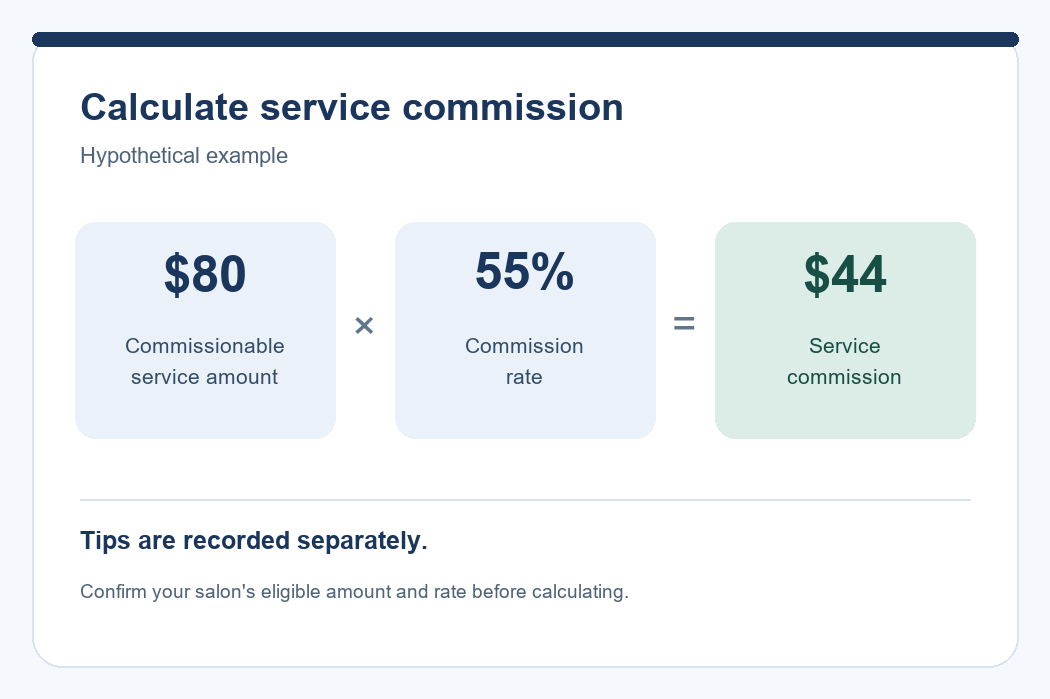
Commission = Commissionable Service Revenue × Commission Rate
Commissionable service revenue means the service amount your salon uses as the basis for calculating commission. This may differ from the ticket total, which can also include tips, sales tax where applicable, retail items, or other charges.
Commission rate is the percentage applied to that eligible service amount. For calculation purposes, convert the percentage to a decimal: 50% becomes 0.50, 55% becomes 0.55, and 60% becomes 0.60.
For example, if a technician performs a service with a commissionable amount of $80 and the applicable rate is 55%:
$80 × 0.55 = $44 commission
This result represents service commission only. Tips and any other compensation components should remain identifiable in your records rather than being folded into the commission figure.
Confirm the Commission Rules Before You Start
Before calculating individual tickets, write down the rules that determine the amount and rate to use. A clear calculation method makes it easier to explain the result, check discrepancies, and apply the same approach throughout the period.
Confirm the Rate for Each Technician or Service
Identify the applicable rate before multiplying any amounts. Depending on your salon’s arrangement, one technician may have the same rate for all eligible services, or different services may use different rates.
Your calculation reference should answer:
- Which rate applies to each technician?
- Does the rate change by service?
- Are add-ons calculated at the same rate as the main service?
- When does a new rate take effect?
- Who reviews questions about an incorrect or missing rate?
If a rate changes during a calculation period, retain the effective date. Do not automatically apply the latest rate to every earlier ticket.
Define the Service Amount Used for Commission
If you are reviewing how services, discounts, and technician assignments are recorded before calculating commission, explore the Senverse nail salon POS system. During a demo, use one of your own sample tickets to confirm how its workflow fits your commission rules.
The amount a customer pays and the amount used to calculate commission are not always identical. For a discounted service, for example, your calculation needs to specify whether the eligible amount is the original service price or the amount after the discount.
Use a written reference that explains how your salon treats:
- Regular service prices.
- Service add-ons.
- Discounts applied to a service or an entire ticket.
- Packages containing more than one service.
- Services performed by more than one technician.
- Retail items or other amounts outside the service commission calculation.
In the examples and worksheet below, tips and sales tax are recorded separately from the commissionable service amount. This keeps the calculation focused on the service revenue being used.
If a ticket contains several services and one overall discount, establish how that discount is allocated to the service lines before calculating commission. Otherwise, two people reviewing the same ticket may arrive at different results.
Choose the Calculation Period
Define the start date, end date, and ticket cutoff for each calculation period. Specify which ticket date or status determines whether a service belongs in that period.
For example, if your worksheet covers October 1 through October 7, the person preparing it should know how to handle a service completed on October 7 but recorded or corrected on October 8.
Keep the following details visible:
- The period’s start and end dates.
- The cutoff used to select eligible tickets.
- The ticket date used for inclusion.
- The handling of corrections received after the period closes.
A correction should remain connected to its original ticket, even when it is reviewed in a later period.
Nail Technician Commission: Worked Examples
The following examples move from a single service to more detailed tickets. Each example states the commissionable amount and applicable rate before calculating the result.
Example 1: One Service at One Commission Rate
A technician performs one service. For this hypothetical example, the full $50 service amount is eligible for commission, and the applicable rate is 60%.
| Service | Commissionable Amount | Commission Rate | Calculation | Commission |
|---|---|---|---|---|
| Manicure service | $50.00 | 60% | $50.00 × 0.60 | $30.00 |
Result: The service commission is $30.00. Any tip is recorded separately.
Example 2: Multiple Services at the Same Rate
A technician performs three eligible services during the calculation period. Each uses the same hypothetical commission rate of 55%.
| Service | Commissionable Amount | Commission Rate | Commission |
|---|---|---|---|
| Manicure service | $40.00 | 55% | $22.00 |
| Pedicure service | $60.00 | 55% | $33.00 |
| Nail enhancement service | $80.00 | 55% | $44.00 |
| Total | $180.00 | 55% | $99.00 |
Because all three services use the same rate, you can also calculate:
($40 + $60 + $80) × 0.55 = $180 × 0.55 = $99 commission
Result: The total service commission is $99.00.
Keep the individual service lines even when you use a combined calculation. They allow you to trace the total back to the tickets if someone raises a question.
Example 3: Different Rates for Different Services
When service rates differ, calculate each service separately. Do not multiply the entire ticket by one rate unless that rate applies to every eligible line.
| Service | Commissionable Amount | Commission Rate | Calculation | Commission |
|---|---|---|---|---|
| Manicure service | $40.00 | 50% | $40.00 × 0.50 | $20.00 |
| Nail enhancement service | $80.00 | 60% | $80.00 × 0.60 | $48.00 |
| Nail art add-on | $20.00 | 50% | $20.00 × 0.50 | $10.00 |
| Total | $140.00 | Varies by service | $20.00 + $48.00 + $10.00 | $78.00 |
Result: The total commission is $78.00.
Applying 60% to the entire $140 ticket would produce $84.00, which does not match the rates specified in this example. Calculating by service line prevents that mismatch.
Example 4: A Discounted Service
Suppose a service has an original price of $100, the customer receives a $20 discount, and the technician’s applicable rate is 60%.
The commission result depends on the basis established for that discount. The table below compares two hypothetical calculation methods; it does not recommend either method as a universal salon policy.
| Calculation Basis | Commissionable Amount | Commission Rate | Calculation | Commission |
|---|---|---|---|---|
| Original service price before the discount | $100.00 | 60% | $100.00 × 0.60 | $60.00 |
| Service amount after the discount | $80.00 | 60% | ($100.00 − $20.00) × 0.60 | $48.00 |
Result: The two methods produce a $12.00 difference in commission.
The important calculation step is identifying the applicable basis before multiplying. Record the original amount, discount, and commissionable amount so the result can be checked without reconstructing the ticket.
Example 5: One Ticket Shared by Two Technicians
When two technicians perform different services on the same ticket, assign the eligible service revenue to the technician who performed each service before calculating commission.
In this hypothetical ticket, Alex performs a $45 manicure at a 55% rate, and Jamie performs a $65 pedicure at a 60% rate.
| Technician | Service | Commissionable Amount | Commission Rate | Commission |
|---|---|---|---|---|
| Alex | Manicure service | $45.00 | 55% | $24.75 |
| Jamie | Pedicure service | $65.00 | 60% | $39.00 |
| Ticket total | $110.00 | Varies by technician | $63.75 | |
The individual calculations are:
- Alex: $45.00 × 0.55 = $24.75.
- Jamie: $65.00 × 0.60 = $39.00.
- Total service commission: $24.75 + $39.00 = $63.75.
Do not assign the full $110 service amount to both technicians. That would count the same revenue twice.
If two technicians share one service rather than performing separate services, document how that service amount is allocated before applying their respective rates. The allocated amounts should reconcile to the eligible amount for that service.
Turn assignment and commission calculation answer different questions. A turn system helps organize who receives work, while commission calculations determine the amount associated with eligible services. For the assignment side of the workflow, see how a nail salon turn system works.
Keep Tips Separate From Service Commission
Record service commission and tips in separate fields. This makes it easier to explain which amount comes from the commission formula and which amount comes from the customer’s tip.
For example, a hypothetical ticket has a commissionable service amount of $70, a commission rate of 60%, and a $15 tip recorded for the technician.
| Item | Calculation or Record | Amount |
|---|---|---|
| Service commission | $70.00 × 0.60 | $42.00 |
| Tip recorded for the technician | Recorded separately from service revenue | $15.00 |
Result: The worksheet shows $42.00 in service commission and $15.00 in tips. The service commission remains $42.00.
Do not multiply the combined $85 service-and-tip amount by 60% in this example. That would apply the service commission rate to a tip that is being tracked separately.
This example explains record separation only. It does not establish a tip-sharing policy or determine how tips should be distributed or processed through payroll.
Review Refunds and Ticket Corrections
A ticket may change after its first calculation. The recorded service amount could be incorrect, the wrong technician could be assigned, or a customer refund could require review.
Keep a record of the change rather than overwriting the original information without an explanation. Useful details include:
- The original ticket number and service date.
- The original service amount and technician assignment.
- The corrected amount or assignment.
- The reason for the change.
- The date of the review.
- The calculation period affected.
- The person who reviewed the correction.
For a simple data-entry correction, suppose a service was entered as $90 when the confirmed commissionable amount was $80. At a hypothetical rate of 55%:
- Original calculation: $90.00 × 0.55 = $49.50.
- Corrected calculation: $80.00 × 0.55 = $44.00.
- Difference to review: $49.50 − $44.00 = $5.50.
This identifies a calculation difference. It does not authorize a deduction from money already paid to a technician.
For refunds, do not assume that every refunded dollar automatically reduces technician compensation. Record the refund and review the applicable arrangement and requirements before deciding how it affects the commission record.
If a period has already closed, connect any subsequent correction to the original ticket and retain a clear explanation of how it was resolved.
Build a Simple Nail Technician Commission Worksheet
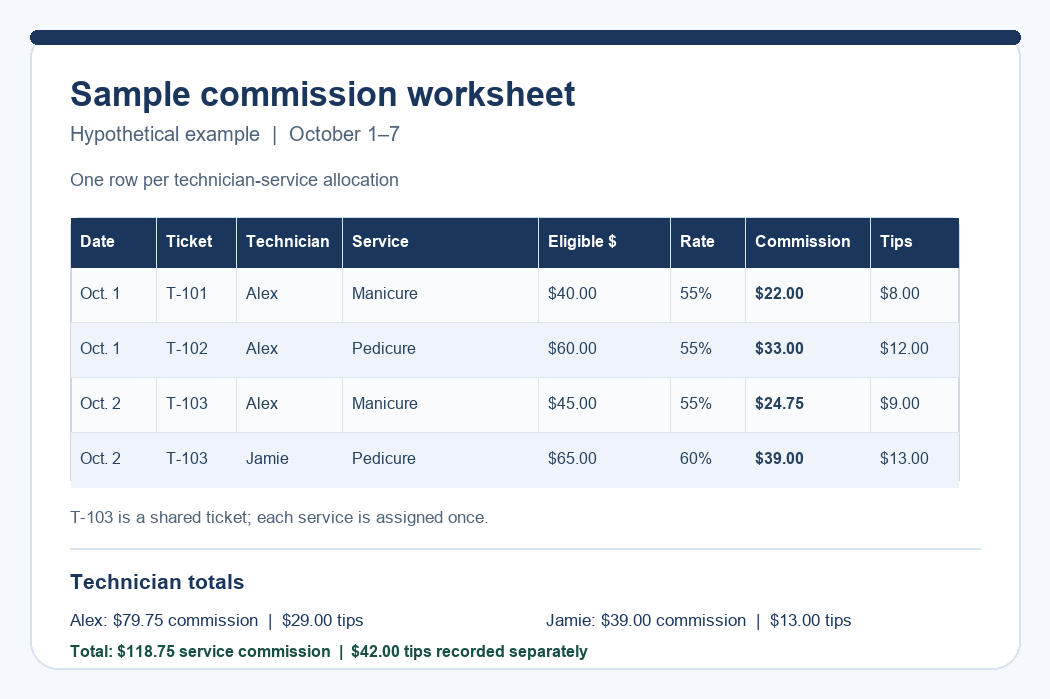
A useful commission worksheet lets you trace each total back to a service line. Start with one row per technician-service allocation rather than one row per customer ticket when a ticket includes multiple services or technicians.
Include these fields:
- Date: The service or ticket date used for your calculation period.
- Ticket: The reference number used to locate the original transaction.
- Technician: The person assigned to the service amount.
- Service: The service or add-on being calculated.
- Commissionable amount: The confirmed amount used in the formula.
- Rate: The percentage applicable to that line.
- Commission: The calculated service commission.
- Tips: A separate record of tips assigned to the technician.
- Notes: Discount details, corrections, or items requiring review.
| Date | Ticket | Technician | Service | Commissionable Amount | Rate | Commission | Tips | Notes |
|---|---|---|---|---|---|---|---|---|
| Oct. 1 | T-101 | Alex | Manicure service | $40.00 | 55% | $22.00 | $8.00 | No discount |
| Oct. 1 | T-102 | Alex | Pedicure service | $60.00 | 55% | $33.00 | $12.00 | No discount |
| Oct. 2 | T-103 | Alex | Manicure service | $45.00 | 55% | $24.75 | $9.00 | Alex’s service on a shared ticket |
| Oct. 2 | T-103 | Jamie | Pedicure service | $65.00 | 60% | $39.00 | $13.00 | Jamie’s service on a shared ticket |
In this example, each tip is recorded once against the corresponding service line. If your source records tips at the ticket level, avoid copying the entire ticket tip onto every service row.
Then summarize the period by technician:
| Technician | Commissionable Service Revenue | Service Commission | Tips Recorded Separately |
|---|---|---|---|
| Alex | $145.00 | $79.75 | $29.00 |
| Jamie | $65.00 | $39.00 | $13.00 |
| Total | $210.00 | $118.75 | $42.00 |
These are commission and tip records, not a calculation of net pay.
For a spreadsheet, multiply the commissionable amount by a rate stored as a percentage. For example, if the amount is in E2 and the percentage is in F2, a formula such as =ROUND(E2*F2,2) calculates the line commission to two decimal places.
Use a consistent rounding method. Rounding each service line and then adding the results can sometimes differ by a cent from rounding only the final total. Document which method your worksheet uses.
Check the Totals at the End of Each Period
Use this review when closing a calculation period. Work from the source tickets to the worksheet, then reconcile each technician summary with its service lines. Mark any unresolved item before treating the period as complete.
- Check the period: Confirm that all included tickets meet the stated date and cutoff rules.
- Check service coverage: Look for missing services, add-ons, and duplicate entries.
- Check technician assignments: Verify who performed each service, especially on shared tickets.
- Check the commissionable amount: Confirm the handling of discounts and service allocations.
- Check the rate: Use the correct technician or service rate and its effective date.
- Check separate amounts: Ensure tips and other non-service amounts have not entered the service commission formula.
- Review corrections: Resolve flagged changes or clearly identify what remains open.
- Reconcile the summary: Confirm that each technician’s total equals the sum of their service commission lines.
If your salon is reviewing how ticket and technician information fits into its broader workflow, explore the Senverse nail salon POS system. Bring sample tickets and your commission worksheet to a discussion so you can confirm how the available workflow matches your needs.
Common Nail Technician Commission Calculation Mistakes
If a commission amount does not match the source ticket or the technician summary, use the following mistakes as a troubleshooting guide. Check the underlying service amount, assignment, rate, and tip record before changing the formula.
- Using the full ticket total: A ticket may include tips, sales tax, retail items, or other amounts that are outside the defined service commission basis.
- Entering a percentage incorrectly: In manual math, use 0.60 for 60%. In a spreadsheet, verify that the rate cell contains 60% or 0.60 rather than the number 60.
- Applying one rate to different-rate services: Calculate service lines separately when their rates differ.
- Handling discounts inconsistently: Use the documented basis rather than switching between original and discounted prices.
- Assigning a shared ticket to both technicians in full: Allocate the eligible service amounts without duplicating revenue.
- Counting a ticket twice: Check ticket and service references when combining records from more than one source.
- Copying ticket-level tips onto every row: Keep tip entries separate and prevent duplication across service lines.
- Ignoring a rate’s effective date: Apply the rate that belongs to the relevant service date or agreed calculation rule.
- Overwriting corrections without notes: Preserve enough information to explain why a total changed.
- Using inconsistent rounding: Follow one documented method throughout the worksheet.
When investigating a discrepancy, start with the ticket, technician, commissionable amount, and rate. These four fields usually provide the clearest path back to the calculation.
A Commission Calculation Checklist for Salon Owners
After completing the detailed review, use this checklist as a final sign-off for the period:
- The calculation period and ticket cutoff are clearly stated.
- Every eligible service is included once.
- Each service is assigned to the correct technician.
- Shared service amounts reconcile to the eligible amount without duplication.
- The correct rate and effective date are applied.
- Discounts follow the documented calculation basis.
- Tips and sales tax are separate from the service commission calculation.
- Refunds and ticket corrections have been reviewed and documented.
- The rounding method is consistent.
- Technician summaries match the underlying service lines.
- Unresolved questions are visible rather than hidden in a final total.
- The reviewed worksheet is retained with its supporting ticket references.
A clear worksheet should let you answer three questions for any commission amount: which service produced it, which rate applied, and how the result was calculated.
Discuss Your Salon’s Commission Workflow With Senverse
Your commission worksheet is connected to the way your salon records services, assigns technicians, and reviews completed tickets. When those details are clear, it is easier to trace a calculation and resolve questions.
For a discussion with Senverse, prepare a few sample tickets, your current commission rates, and an example of a shared or discounted service. These materials help explain your actual workflow and identify the steps you want to review.
During the demo, ask how service and technician information is recorded and which parts of your current process Senverse can support. Confirm any commission calculation, reporting, or export requirements directly rather than assuming they are included.
Book a Demo to discuss your salon’s workflow with Senverse.