

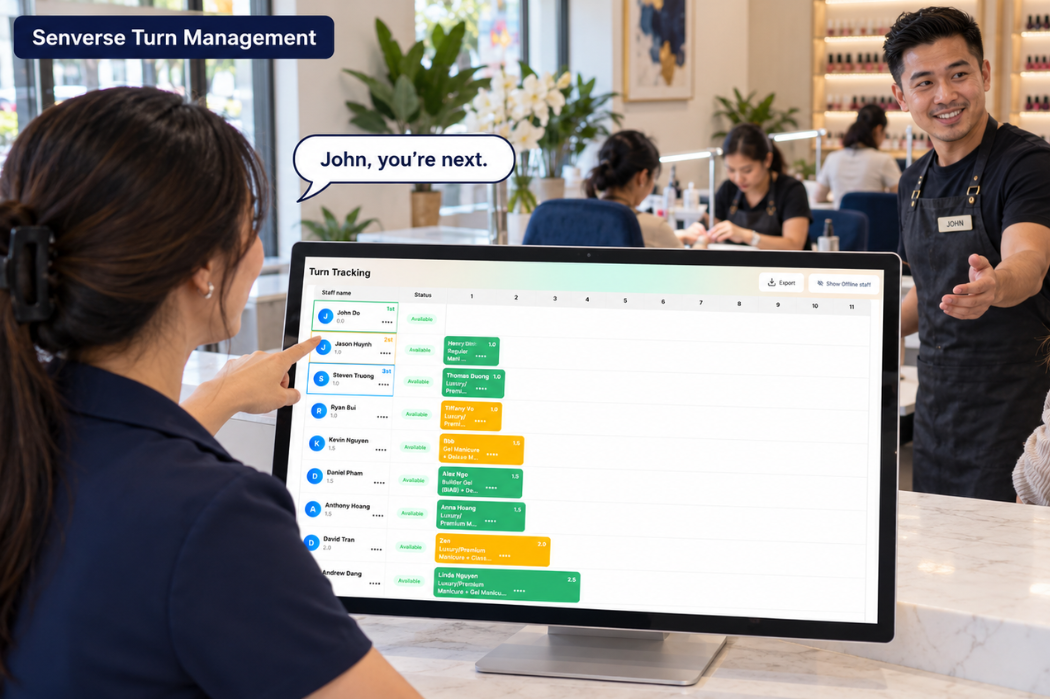
During busy hours, the front desk needs to keep track of appointments, walk-ins, requested services, and each technician’s status. When a client changes services or a technician needs a break, assigning work requires an even clearer process.
Senverse turn management, through its Smart Turn Management feature, supports real-time turn tracking, service-based turn settings, and turn distribution based on services or prices. The system also supports appointments, walk-ins, and adjustments that occur during the workday.
To use it effectively, salon owners need to define turn-counting rules, agree on how to handle exceptions, and help the team understand how to follow information on the Turn Board.
How Senverse Turn Management Works
The Role of Smart Turn Management
Smart Turn Management helps salon owners and front-desk staff manage technician turns according to the salon’s rules.
Each salon may distribute turns differently. Some base turns on the services performed, while others use service prices. Situations such as appointments, requests for specific technicians, or temporary technician breaks also need to be considered in daily operations.
Senverse provides turn management capabilities to support that process. Owners need to agree on the applicable rules before configuring the system and training staff.
This feature is part of the Senverse POS system for nail salons, supporting turn management in the salon’s daily operations.
For a broader explanation of turn-counting rules and daily salon workflows, read our guide to how a nail salon turn system works.
Track Turns in Real Time with the Turn Board
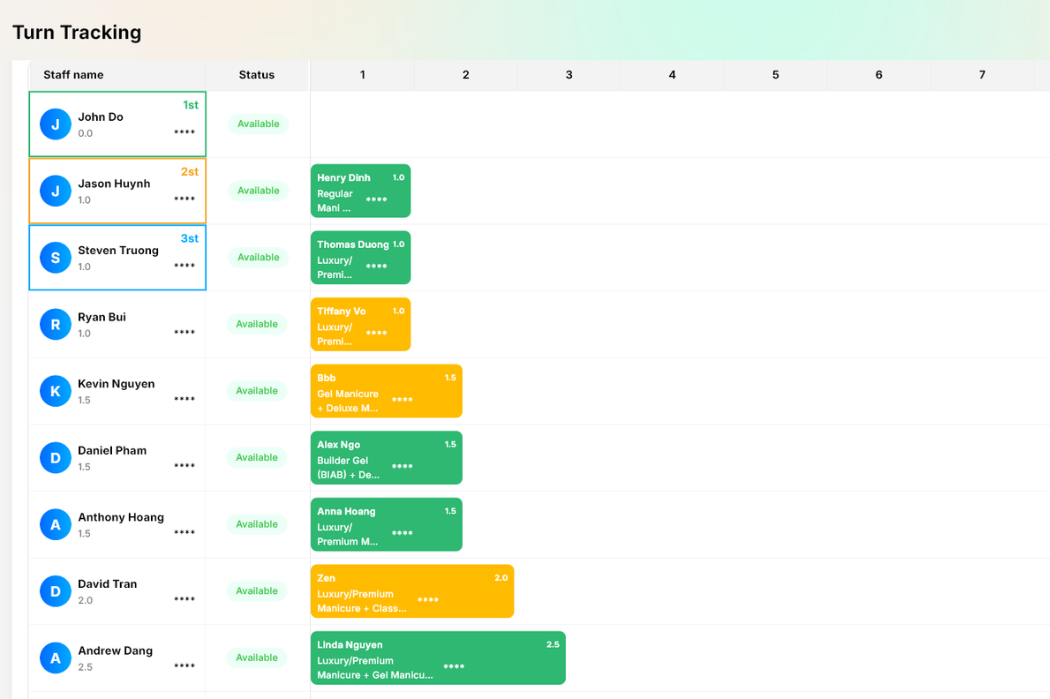
Senverse supports real-time turn tracking and displays turn management information on the Turn Board.
Front-desk staff can follow this information when considering client assignments. When changes occur, the person responsible needs to review the situation to continue applying the salon’s rules.
The Turn Board gives the team a shared reference for tracking turns. To use it consistently, front-desk staff and technicians need to understand how to read the information and which rules are being applied.
Set Up Turn Management Rules in Senverse
By Service
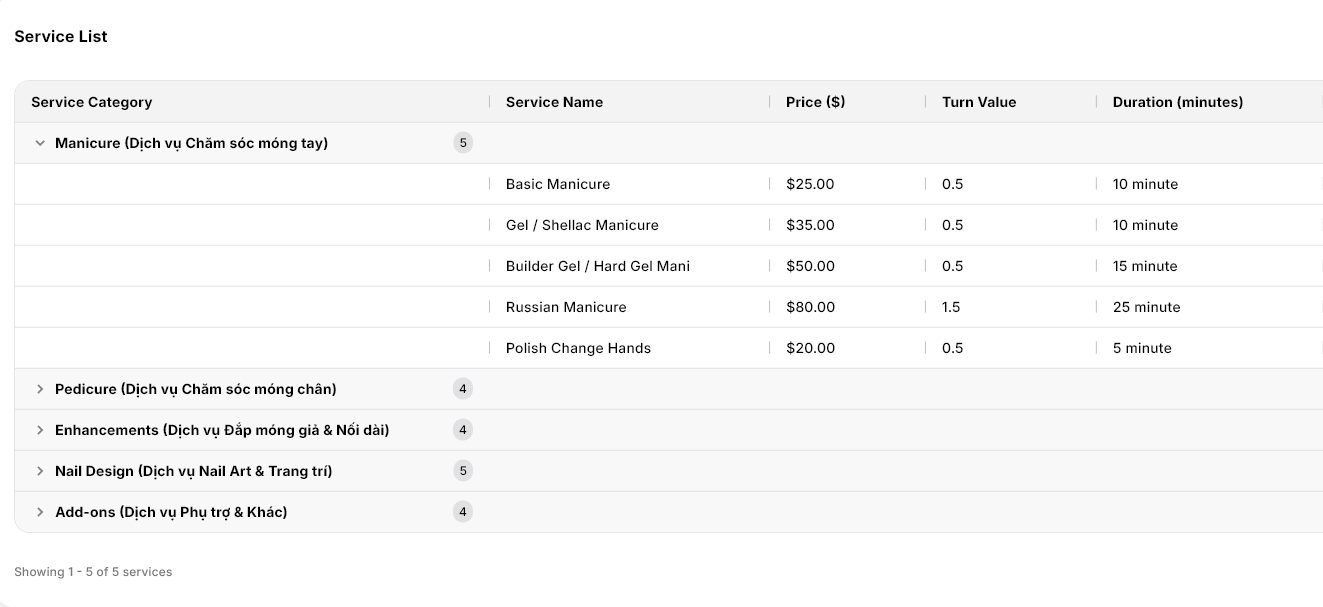
Senverse supports assigning a Turn Value to individual services. Salon owners can set how each service counts toward technician turns according to the salon’s rules.
Example: In the service list shown, Basic Manicure and Gel / Shellac Manicure each have a Turn Value of 0.5, while Russian Manicure has a Turn Value of 1.5. Services within the same category can have different turn values.
By Price
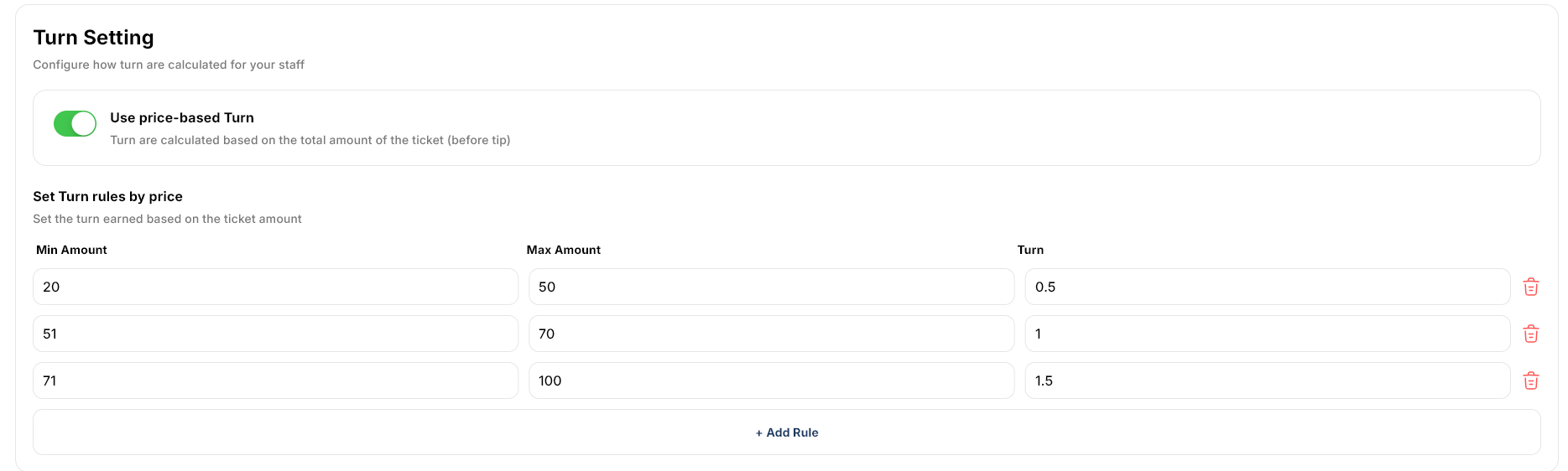
Senverse supports price-based turn rules using the total ticket amount before tip. Salon owners can define minimum and maximum amounts for each range and assign a corresponding turn value.
Example: The configuration shown uses the following amount ranges:
| Ticket Amount Before Tip | Turn Value |
|---|---|
| $20–$50 | 0.5 |
| $51–$70 | 1 |
| $71–$100 | 1.5 |
Under these settings, a $40 ticket earns 0.5 turns, a $60 ticket earns 1 turn, and an $80 ticket earns 1.5 turns.
The service values and price ranges above reflect the configurations shown in the screenshots. They are not universal Senverse defaults.
Agree on How to Handle Exceptions
Along with turn-counting methods, owners need to establish rules for situations that may arise:
- Appointments and walk-ins: How turns are counted for each client group, including clients who request a specific technician.
- Technicians taking breaks or returning to work: How turns resume according to the salon’s rules.
- Changes during a service: When turns need to be reviewed and adjusted.
- Responsibility for adjustments: Who makes changes and checks the information afterward.
Clear rules help front-desk staff and technicians understand turn management and provide a consistent basis for handling exceptions.
Manage Turns During the Workday
Manage Appointments and Walk-Ins
Senverse supports appointments and walk-ins in the turn management process. Before assigning a walk-in, front-desk staff should check the requested service, current turn information, technician availability, and upcoming appointments.
A technician who is available now may have an appointment approaching. Staff should consider that booking before assigning additional work. For clients who request a specific technician, apply the salon’s agreed turn-counting policy.
Handle Technicians Taking Breaks or Returning to Work
Senverse supports temporary absence or pause statuses in turn management. Technicians should communicate when they take a break and when they are ready to accept clients again so front-desk staff can keep assignments aligned with their availability.
When a technician returns, resume turns according to the salon’s established policy and system configuration.
Adjust for Changes During a Service
Senverse supports adjustments when changes occur during a service. If a client switches services, check whether the new service has a different Turn Value. When using price-based rules, check whether the updated ticket total before tip falls into a different amount range.
The staff member responsible for turn adjustments should make any necessary changes and review the updated information on the Turn Board before the next assignment.
An Example of Turn Management During Busy Hours
The Situation at the Front Desk
Suppose three technicians are working:
- Technician A: Available to accept a client.
- Technician B: Performing a service.
- Technician C: Has an appointment coming up shortly.
Two walk-in clients arrive together: one requests a Basic Manicure, and the other requests a pedicure.
This hypothetical example illustrates front-desk decisions. It does not describe an automatic assignment algorithm in Senverse.
Review Information Before Making Assignments
| What to Check | How It Affects the Decision |
|---|---|
| Requested services | Identify which technicians can perform each service. |
| Current turn information | Review the Turn Board alongside technician availability. |
| Technician B’s current service | Confirm availability before assigning another client. |
| Technician C’s upcoming appointment | Consider whether an additional service would conflict with the booking. |
Technician A may be considered for one of the walk-ins after staff check service suitability and turn information. The remaining client’s assignment depends on the other technicians’ availability and the upcoming appointment.
Apply the Counting Rule When a Service Changes
If the Basic Manicure client switches to Russian Manicure, the service-based configuration shown earlier assigns different values: 0.5 turns for Basic Manicure and 1.5 turns for Russian Manicure. Staff should review the turn entry and adjust it as needed.
If the salon uses price-based rules instead, staff should check the revised ticket total before tip against the configured amount ranges.
Explore a Turn Management Workflow for Your Salon
To review how Senverse turn management fits your salon, bring your service list, current turn-counting rules, and common exceptions to a demo. Include examples of service changes, technician requests, and breaks so you can discuss how these situations would be handled.
Use these examples to review service Turn Values, ticket amount ranges before tip, and the information displayed on the Turn Board. For a broader system review, see our Senverse POS demo guide.
Book a Senverse demo to explore a turn management workflow based on your salon’s needs.