


To manage nail salon walk-ins during busy hours, record each arrival, confirm the requested service, check technician and station availability, then give a realistic wait estimate. Before assigning a technician, account for customers already waiting and upcoming appointments. Keep one shared waiting list updated whenever the service, estimate, or customer status changes.
A clear process helps the front desk make consistent decisions when several customers arrive at once. It also gives customers a straightforward explanation when someone who arrived later can start a different service sooner.
How to Manage Nail Salon Walk-Ins: A Practical Workflow
Knowing how to manage nail salon walk-ins during busy hours starts with a consistent front-desk process. Record each arrival, confirm the requested services, check technician availability and upcoming appointments, explain the estimated wait, and assign a technician when ready. Keep one shared waiting list updated so staff know who is waiting and what each customer needs.
- Record the customer’s arrival. Add their name and arrival time to one shared waiting list, including the number of people requesting service.
- Confirm services and preferences. Ask which services each customer wants and whether they prefer a specific technician or the next available qualified technician.
- Check the schedule and available technicians. Review services already in progress, upcoming appointments, and whether a suitable technician has enough time to complete the requested service.
- Explain the estimated wait. Give an estimate based on the current workload. If the timing does not work for the customer, offer an available appointment time instead.
- Assign a technician and update the waiting list. Follow the salon’s assignment rules, confirm the service details with the technician, and mark the customer as in service. Update waiting customers if their estimated wait changes.
Use arrival order as a starting point, while accounting for service requirements, technician requests, and scheduled appointments. Explain any differences in waiting time so customers understand why someone who arrived later may begin a different service first.
Start With a Consistent Walk-In Check-In Process
Use the same check-in process for every walk-in, including customers who arrive as a group. Assign one front-desk team member to maintain the queue during busy periods and hand it over clearly at shift changes.
Confirm Services and Technician Preferences
Ask enough questions to understand the service before adding the customer to the queue. A request for a manicure, for example, may also involve product removal or nail art that needs to be considered when checking availability.
- Requested services: What would each customer like done? Clarify any removal, repairs, or additional services.
- Technician preference: Is the customer waiting for a specific technician, or are they comfortable with the next available technician who provides that service?
- Party size: How many people need services, and what does each person want?
- Group expectations: Do they want to start together, or are staggered start times acceptable?
For a group, create a separate entry for each person and note that they are together. Check whether enough suitable technicians and service stations will be available before offering simultaneous start times. If that is not possible, explain the available options before the group decides to wait.
Keep One Shared Waiting List
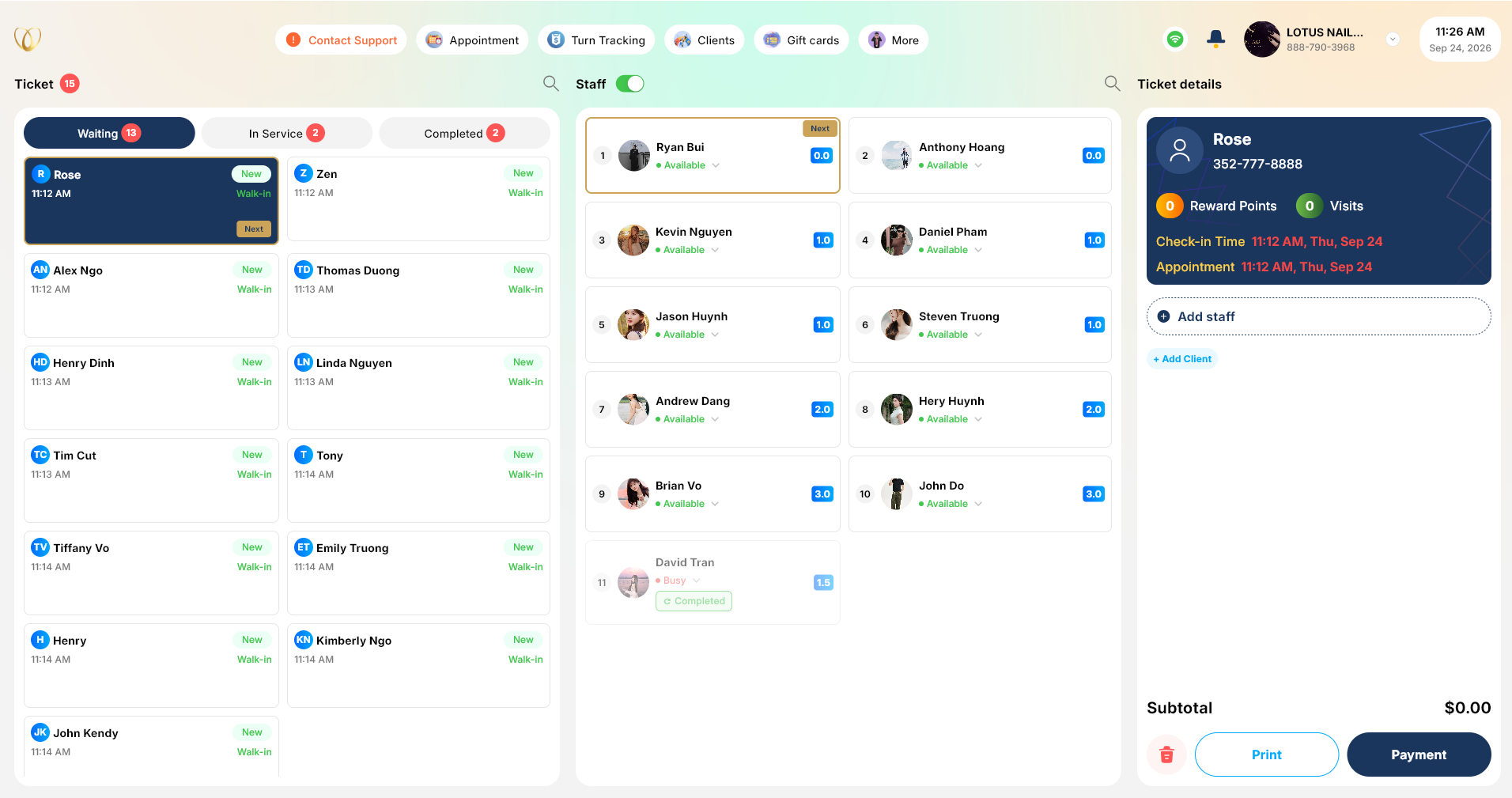
Keep one waiting list that the front desk can review and update throughout the visit. A paper log or digital tool can work, as long as the team records the following details consistently:
| Field | What to Record |
|---|---|
| Customer name or identifier | A name or identifier staff can use to call the customer without confusion. |
| Arrival time | When the customer checked in, to preserve arrival order. |
| Requested services | The service and any confirmed removal, repairs, or additions. |
| Party details | Group size, linked customer entries, and whether staggered starts are acceptable. |
| Technician preference | The requested technician or a note that the customer accepts the next available qualified technician. |
| Wait estimate communicated | The estimated wait given to the customer and the time it was last updated. |
| Current status | Waiting, temporarily away, in service, or no longer waiting. |
Update the entry whenever a customer changes services, leaves the waiting area, or begins service. Before handing the list to another team member, flag customers who need an update and any groups waiting to start together.
If you are evaluating a nail salon POS system, use these waiting-list requirements during the demo. Ask the provider to show how staff can record walk-ins, review their status, and coordinate technician assignments alongside scheduled appointments.
Check Capacity Before Quoting a Wait Time
Base each walk-in wait estimate on when a suitable technician and service station can realistically be ready. The number of customers waiting is only part of the picture. Check services in progress, customers ahead in the queue, and upcoming appointments before telling someone when they may begin.
Review Technician Availability and Upcoming Appointments
Before quoting a wait, review the schedule and confirm availability with the technicians involved. A technician finishing a service may have an appointment next, need time to prepare the station, or be unavailable for the service the walk-in requested.
- Service fit: Identify which technicians can perform the requested service, including any removal, repairs, or nail art.
- Work in progress: Ask about the expected remaining time instead of assuming a service is almost finished based on appearance.
- Customers already waiting: Account for earlier arrivals who need the same technician or service station.
- Upcoming appointments: Check whether the technician has enough time to complete the walk-in service and prepare for the next booking.
- Station readiness: Allow time for cleanup and preparation before seating the next customer.
If the timing is unclear, let the customer know you are checking before giving an estimate. Avoid promising an immediate start simply because a chair is empty.
Explain the Estimate and Update Customers When It Changes
State the expected wait as an estimate, with a range when appropriate. Explain any condition that affects it, such as waiting for a preferred technician. Make sure the customer understands that the estimate refers to when the service may start, not when it will be completed.
For example, if the current schedule supports the estimate, the front desk might say:
“The estimated wait for your pedicure is about 20 to 30 minutes. That depends on when the technician finishes with their current customer. We’ll keep you updated if the timing changes.”
If a delay becomes clear, update the customer before the previously quoted window passes. Explain the revised estimate and offer a choice: continue waiting, see another suitable technician if available, or choose an available appointment time.
Record the revised estimate on the shared waiting list so every front-desk team member communicates the same information. If a customer has a firm departure time, check whether both the wait and the full service can fit before accepting the request.
Balance Walk-Ins With Scheduled Appointments
Accept a walk-in when the available opening allows enough time to complete the requested service and prepare for the next appointment. An open slot on the schedule does not necessarily mean a technician can fit in another customer. Consider the full service, including any confirmed additions, before offering that opening.
Use these guidelines when deciding whether to seat a walk-in:
- Protect upcoming bookings. Avoid starting a service that is likely to delay a scheduled customer. Check with the assigned technician if the available time is uncertain.
- Offer another suitable technician. If the customer’s preferred technician has an appointment coming up, explain whether someone else can provide the service sooner.
- Confirm changes before adding services. If a seated walk-in requests extra services, review the remaining time before agreeing. Explain what can be completed during the current visit and what may require a separate appointment.
- Handle late appointments consistently. Follow the salon’s established late-arrival policy before offering the reserved time to a walk-in. Do not assume a booking is available simply because the customer has not arrived yet.
When there is not enough time to begin, give the walk-in a clear choice: wait for the next suitable opening or book an available appointment. Explain the current estimate without pressuring the customer to stay.
“This technician has an appointment coming up, so there isn’t enough time to complete your service beforehand. I can check the next available opening if you’d like to wait, or help you book a time to return.”
If the customer chooses to return, confirm the service, date, time, and technician preference, then update the waiting list so staff do not continue holding their place in the current queue.
Assign Walk-Ins Using Clear, Consistent Rules
Use the customer waiting list and the technician turn order together when assigning walk-ins. The waiting list tracks who arrived and what they need, while the turn order determines which technician should receive the next eligible service under the salon’s rules. Understanding [how a nail salon turn system works] helps the front desk apply these rules consistently. Being next in the technician rotation does not always mean being available for the next customer’s request
Before making an assignment, check these factors:
- Customer arrival order: Use check-in order as the starting point for customers waiting for comparable services and available technicians.
- Service requirements: Confirm that the technician can perform the requested service and any agreed additions.
- Customer preference: Honor a specific technician request when possible, and explain how that choice affects the wait. Ask before assigning someone else.
- Availability: Check that the technician is ready and has enough time before their next scheduled appointment.
- Turn rules: Apply the salon’s established rules for rotation, requested technicians, and assignments that must be skipped or deferred.
For example, a customer waiting for a specific nail technician may remain in the queue while a later arrival starts a pedicure with another available technician. Explain that the customers are waiting for different availability, rather than leaving the first customer to assume their place was overlooked.
Agree in advance on how exceptions affect technician turns. If a technician cannot take a particular service, staff should know whether that technician keeps their position or moves in the rotation according to salon policy. Apply the same rule consistently instead of deciding differently for each customer.
Once the assignment is confirmed, share the service details with the technician and update the customer’s status. Record any exception that the next front-desk team member needs to understand.
Handle Common Busy-Hour Situations
When a walk-in’s plans or preferences change, review availability before making a new commitment. Explain the options to the customer and update the shared waiting list so other staff members can follow through.
| Situation | Front-Desk Response | What to Record |
|---|---|---|
| A group wants to start together. | Confirm each person’s service and check whether enough suitable technicians and stations will be ready together. If not, offer staggered starts or an available appointment that can accommodate the group. | Each person’s service, their group connection, and whether they accept different start times. |
| A customer requests a technician who is busy. | Check the technician’s current workload and upcoming bookings. Explain the estimated wait and ask whether the customer prefers to wait, choose another qualified technician, or book a later appointment. | The requested technician, the estimate communicated, and the customer’s choice. |
| A customer changes services while waiting. | Recheck the required time, technician suitability, and station availability. Explain whether the change affects the wait before confirming the updated request. | The revised service, any change in technician assignment, and the updated wait estimate. |
| A customer leaves temporarily and returns. | Before they leave, explain the salon’s policy for holding a place and what happens if they are away when called. When they return, check the current queue and provide a fresh estimate under that policy. | That the customer is temporarily away, any agreed return arrangement, and their status when they return. |
If a situation falls outside the salon’s established rules, ask the designated manager to resolve it before promising an exception. Share the decision with the team, especially if it changes a customer’s place in line or a technician’s assignment.
A Busy-Hour Walk-In Example

The following hypothetical example shows how a front desk might balance walk-ins with scheduled appointments. Times are illustrative, not standard service durations or actual Senverse customer results.
At 2:00 p.m., two walk-in customers arrive:
- Customer A arrives first and requests a manicure with any available qualified technician.
- Customer B arrives next and requests a pedicure with a specific technician.
Before quoting a wait, the front desk checks the schedule and confirms these details with the team:
Technician 1 Available now; has a 2:30 p.m. appointment. Customer A’s service and station preparation would take about 45 minutes. Do not assign Customer A: the service would overlap the appointment. Technician 2 Ready around 2:15 p.m.; has enough time for Customer A’s service. If the salon’s turn rules allow it, quote Customer A an estimated 15-minute wait. Technician 3 Customer B’s requested technician; ready around 2:10 p.m. with enough time for the pedicure. Quote Customer B an estimated 10-minute wait.
The front desk explains that Customer B may start first because the two customers need different technician availability. Customer A keeps their place for the next suitable manicure opening, while Technician 1 remains available for the scheduled appointment.
If Technician 2 later expects to be ready at 2:25 p.m. instead, the front desk rechecks whether the service still fits before the next booking. Staff then update Customer A, explain any available alternatives, and record the revised estimate on the waiting list.
A Front-Desk Checklist for Managing Walk-Ins
Keep this checklist at the front desk for busy periods and shift changes.
Before Busy Hours
- Review upcoming appointments, technician schedules, and planned breaks.
- Confirm which technicians can accept each service and check station availability.
- Review the salon’s rules for turn assignments, requested technicians, and customers who leave temporarily.
- Assign someone to maintain the shared waiting list and communicate changes to customers.
When a Walk-In Arrives
- Record the customer’s name or identifier and arrival time.
- Confirm requested services, including removal, repairs, or additions.
- Note technician preferences and, for groups, whether staggered starts are acceptable.
- Check customers already waiting, suitable technicians, and upcoming appointments.
- Communicate an estimated wait and record what the customer was told.
- Offer an available appointment if the customer cannot wait or the service does not fit.
When Handing the Customer Over to a Technician
- Confirm the customer’s identity and agreed services with the assigned technician.
- Recheck timing if the customer has changed or added services.
- Confirm that the station is prepared before seating the customer.
- Mark the customer as in service and update the technician’s status and turn record according to salon rules.
- Review the remaining queue and update anyone whose estimated wait has changed.
Discuss Your Salon’s Walk-In Workflow With Senverse
Every salon handles walk-ins a little differently. Bring your current check-in process, waiting list, and technician assignment rules to a Senverse demo to discuss how they fit into your daily operations.
Walk through a busy-hour scenario with the team, including how you balance walk-ins with appointments and handle requests for specific technicians. You can also review the [Senverse POS walkthrough] to understand the broader workflow from booking and check-in to ticket creation and checkout. Use the demo to confirm which steps Senverse can support and where your front-desk team would still need to make decisions.
Book a Demo to discuss how Senverse could fit your salon’s walk-in workflow.